
Circular Spiral Matrix Program in Java and Python
Circular spiral matrix program with boundary-update algorithm, explanation, Java solution and simple Python solution for ICSE and ISC students.
Question:
Write a program to fill a square matrix of size n × n in clockwise circular or spiral fashion with natural numbers from 1 to n × n.
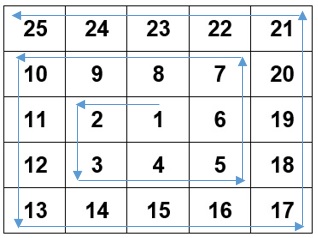
Algorithm:
Step 1: Start.
Step 2: Accept the matrix size n.
Step 3: Declare square matrix A[n][n].
Step 4: Initialize k to 1, row boundaries r1 = 0 and r2 = n - 1, and column boundaries c1 = 0 and c2 = n - 1.
Step 5: Repeat while k is less than or equal to n × n.
Step 6: Fill the top row from column c1 to c2 and increment k after every cell.
Step 7: Fill the right column from row r1 + 1 to r2 and increment k after every cell.
Step 8: Fill the bottom row from column c2 - 1 down to c1 and increment k after every cell.
Step 9: Fill the left column from row r2 - 1 down to r1 + 1 and increment k after every cell.
Step 10: After completing one outer layer, increment r1 and c1 and decrement r2 and c2 to move inward.
Step 11: Continue the loop with the updated boundaries so the next cycle fills only the inner unfilled layer.
Step 12: Display the completed matrix row by row.
Step 13: Stop.
Explanation:
The spiral matrix is filled layer by layer. Four boundary variables are used: r1 and r2 for the top and bottom rows, and c1 and c2 for the left and right columns.
Each loop fills one side of the current layer. The first loop fills the top row, the second fills the right column, the third fills the bottom row, and the fourth fills the left column.
The variable k stores the next number to be placed in the matrix. It is updated after every assignment so every cell gets a different value.
After one full boundary is filled, the row and column limits are moved inward. This boundary update prevents the next cycle from overwriting the layer that has already been filled.
The process stops when k crosses n × n, which means all cells of the square matrix have been assigned.
A circular spiral matrix is filled by moving through changing boundaries. The program normally maintains top, bottom, left and right limits. It fills across the top row, down the right column, across the bottom row in reverse, and up the left column. After each side is filled, the corresponding boundary moves inward. This continues until all cells are filled. The difficulty is careful boundary control; without updating the limits correctly, values may overwrite earlier cells or leave gaps in the spiral.
Java Program:
/**
* The class Circular_Matrix creates a Square Matrix of size n*n and fills it in a circular fashion
* @author : www.guideforschool.com
* @Program Type : BlueJ Program - Java
*/

import java.util.Scanner;
class Circular_Matrix
{
    public static void main(String args[])
    {
        Scanner sc = new Scanner(System.in);
        System.out.print("Enter the number of elements : ");
        int n=sc.nextInt();

        int A[][]=new int[n][n];
        int k=1, c1=0, c2=n-1, r1=0, r2=n-1;

        while(k<=n*n)
        {
            for(int i=c1;i<=c2;i++)
            {
                A[r1][i]=k++;
            }

            for(int j=r1+1;j<=r2;j++)
            {
                A[j][c2]=k++;
            }

            for(int i=c2-1;i>=c1;i--)
            {
                A[r2][i]=k++;
            }

            for(int j=r2-1;j>=r1+1;j--)
            {
                A[j][c1]=k++;
            }

            c1++;
            c2--;
            r1++;
            r2--;
        }

        /* Printing the Circular matrix */
        System.out.println("The Circular Matrix is:");
        for(int i=0;i<n;i++)
        {
            for(int j=0;j<n;j++)
            {
                System.out.print(A[i][j]+ "\t");
            }
            System.out.println();
        }
    }
}
Equivalent Python Program:
# Read the matrix size and set the first value to be filled.
    n = int(input("Enter size of the matrix: "))
    A = []
    for i in range(n):
        A.append([0] * n)

    k = 1
    r1 = 0
    r2 = n - 1
    c1 = 0
    c2 = n - 1

    # Fill one outer boundary at a time, then move the boundaries inward.
    while k <= n * n:
        for i in range(c1, c2 + 1):
            if k <= n * n:
                A[r1][i] = k
                k = k + 1
        for i in range(r1 + 1, r2 + 1):
            if k <= n * n:
                A[i][c2] = k
                k = k + 1
        for i in range(c2 - 1, c1 - 1, -1):
            if k <= n * n:
                A[r2][i] = k
                k = k + 1
        for i in range(r2 - 1, r1, -1):
            if k <= n * n:
                A[i][c1] = k
                k = k + 1

        # Shrink the active row and column limits for the next inner layer.
        r1 = r1 + 1
        r2 = r2 - 1
        c1 = c1 + 1
        c2 = c2 - 1

    for i in range(n):
        for j in range(n):
            print(A[i][j], end="	")
        print()
Output:
Leave a Reply
Your email address will not be published. Comments are reviewed before appearing publicly.