
Decimal to Hexadecimal Conversion Program in Java and Python
Decimal to hexadecimal conversion program with algorithm, explanation, Java solution and simple Python solution for ICSE and ISC students.
Question:
Write a program to input a number in the Decimal number system and convert it into its equivalent number in the Hexadecimal number system.
Hexadecimal number system uses sixteen symbols: 0 to 9 and A to F. For example, decimal 47 is written as 2F in hexadecimal.
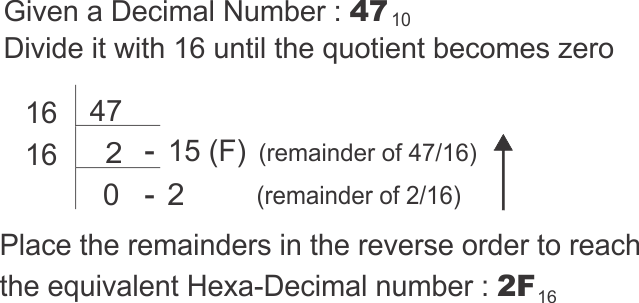
Algorithm:
Step 1: Start.
Step 2: Accept decimal number n.
Step 3: If n is 0, display 0 and stop.
Step 4: Store hexadecimal symbols 0 to F in a character array.
Step 5: Initialize result string s as blank.
Step 6: Repeat while n > 0.
Step 7: Calculate remainder r = n % 16.
Step 8: Add dig[r] before the current result string.
Step 9: Replace n by n / 16 using integer division.
Step 10: Display the hexadecimal result.
Step 11: Stop.
Explanation:
The program converts a decimal number to hexadecimal using repeated division by 16. Hexadecimal is a base-16 number system, so each digit is found from the remainder obtained after division by 16. The remainder may be from 0 to 15, but hexadecimal uses symbols A to F for values 10 to 15.
To handle this neatly, the program uses the character array dig. The index of the array represents the numeric value of the remainder. For example, dig[10] gives 'A' and dig[15] gives 'F'. This avoids writing many separate conditions for the values 10, 11, 12, 13, 14 and 15.
Just like binary and octal conversion, the remainders are obtained from right to left. The first remainder is the last digit of the hexadecimal number. Hence each new symbol is placed before the current result string s. After every pass, n is divided by 16 so that the next hexadecimal place can be processed. When n becomes 0, all digits have been collected. The program also handles input 0 separately to produce the correct answer immediately.
The main idea is that hexadecimal conversion is the same repeated-division process as binary and octal, but with a larger base. The only extra difficulty is representation of values greater than 9. The character array solves this elegantly: the remainder itself becomes the index, so the program can immediately pick the correct symbol. This is clearer than writing separate cases for A through F. The loop therefore focuses on the conversion process, while the array handles the symbol mapping cleanly.
Java Program:
/**
* The class Dec2Hex inputs a Decimal number and converts it into its equivalent Hexadecimal number
* @author : www.guideforschool.com
* @Program Type : BlueJ Program - Java
*/

import java.util.Scanner;

class Dec2Hex
{
    public static void main(String args[])
    {
        Scanner sc = new Scanner(System.in);

        System.out.print("Enter a decimal number: ");
        int n = sc.nextInt();

        // If the entered number is 0, its hexadecimal form is also 0.
        if(n == 0)
        {
            System.out.println("Output = 0");
            return;
        }

        int r; // Stores the remainder obtained after division by 16.
        String s = ""; // Stores the final hexadecimal number.
        // The array position represents a decimal value from 0 to 15.
        char dig[] = {'0','1','2','3','4','5','6','7','8','9','A','B','C','D','E','F'};

        // Continue division until all hexadecimal digits have been obtained.
        while(n > 0)
        {
            r = n % 16; // Remainder decides the hexadecimal digit.
            s = dig[r] + s; // Add before previous digits to maintain correct order.
            n = n / 16; // Move to the next quotient for further conversion.
        }

        System.out.println("Output = " + s);
    }
}
Equivalent Python Program:
n = int(input("Enter a decimal number: "))

digits = "0123456789ABCDEF"

# Zero is handled separately because the loop depends on n being positive.
if n == 0:
    print("Output = 0")
else:
    result = ""

    # Divide by 16 and convert each remainder to the matching hexadecimal symbol.
    while n > 0:
        r = n % 16
        result = digits[r] + result  # The newest digit belongs to the left side.
        n = n // 16

    print("Output =", result)
Output:
Leave a Reply
Your email address will not be published. Comments are reviewed before appearing publicly.