
Decimal to Binary Conversion Program in Java and Python
Decimal to binary conversion program with algorithm, explanation, Java solution and simple Python solution for ICSE and ISC students.
Question:
Write a program to input a number in the Decimal number system and convert it into its equivalent number in the Binary number system.
Binary number system represents numbers using only two digits: 0 and 1. For example, decimal 25 is written as 11001 in binary.
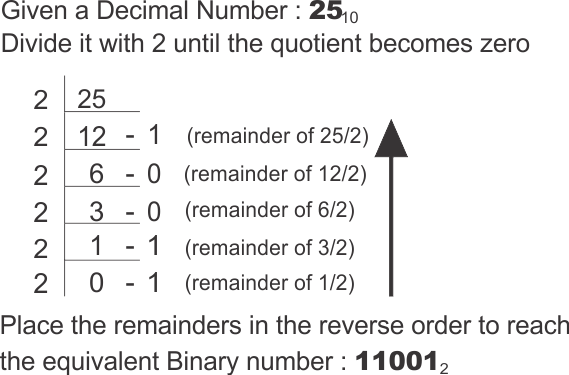
Algorithm:
Step 1: Start.
Step 2: Accept the decimal number n.
Step 3: If n is 0, display 0 and stop.
Step 4: Create a character array dig containing '0' and '1'.
Step 5: Initialize an empty string s to store the binary result.
Step 6: Repeat while n > 0.
Step 7: Find the remainder r = n % 2.
Step 8: Add dig[r] before the current result string so the digits appear in correct order.
Step 9: Divide n by 2 using integer division.
Step 10: Display the final binary string.
Step 11: Stop.
Explanation:
The program uses the standard repeated-division method for converting a decimal number to binary. Since binary is a base-2 system, the decimal number is divided by 2 again and again. In every pass of the loop, the remainder can only be 0 or 1, and that remainder becomes one binary digit.
The important point is the order in which the remainders are produced. The first remainder obtained is actually the rightmost digit of the binary answer, not the leftmost digit. For this reason, the program does not append the new digit at the end of the string. It places dig[r] before the existing string s. This reverses the natural order of the remainders while the answer is being formed.
The character array dig is used as a simple lookup table. If the remainder r is 0, dig[0] gives '0'; if r is 1, dig[1] gives '1'. After each digit is processed, integer division by 2 removes the part already converted. The loop stops when n becomes 0. A separate check is kept for input 0, because the loop would otherwise not run for it.
Conceptually, this program is teaching how place value changes when a decimal number is expressed in base 2. Dividing by 2 repeatedly is not just a shortcut; it is a way of asking which powers of 2 are present in the number. The remainder tells whether the current binary place contains 0 or 1. By reducing the quotient each time, the program slowly moves from smaller binary places to larger binary places. The string-building step then arranges those places in the correct reading order.
Java Program:
/**
* The class Dec2Bin inputs a Decimal number and converts it into its equivalent Binary number
* @author : www.guideforschool.com
* @Program Type : BlueJ Program - Java
*/

import java.util.Scanner;

class Dec2Bin
{
    public static void main(String args[])
    {
        Scanner sc = new Scanner(System.in);

        System.out.print("Enter a decimal number: ");
        int n = sc.nextInt();

        // If the entered number is 0, its binary form is also 0.
        if(n == 0)
        {
            System.out.println("Output = 0");
            return;
        }

        int r; // Stores the remainder obtained after division by 2.
        String s = ""; // Stores the final binary number.
        char dig[] = {'0', '1'}; // Binary digits for remainders 0 and 1.

        // Continue division until the complete decimal number is reduced to 0.
        while(n > 0)
        {
            r = n % 2; // Find the binary digit from the remainder.
            s = dig[r] + s; // Add at the front because remainders come in reverse order.
            n = n / 2; // Remove the last processed binary place.
        }

        System.out.println("Output = " + s);
    }
}
Equivalent Python Program:
n = int(input("Enter a decimal number: "))

# Zero is a special case because the division loop will not run for 0.
if n == 0:
    print("Output = 0")
else:
    digits = ['0', '1']
    result = ""

    # Repeatedly divide by 2 and take the remainder.
    while n > 0:
        r = n % 2
        result = digits[r] + result  # New remainder is placed in front.
        n = n // 2

    print("Output =", result)
Output:
Leave a Reply
Your email address will not be published. Comments are reviewed before appearing publicly.